

Your dream Shopify sections, built in minutes with AI
Maybe you've tried building Shopify websites before, but you found it creatively limiting. That has finally changed. You can now build your dream Shopify sections and layouts in minutes with the help of AI.
Your dream Shopify sections, built in minutes with AI
a.
Shopify
b.
Video
Shopify No Longer Has to Be Creatively Limiting (00:00)
Maybe you've tried building Shopify websites before, but you found it creatively limiting. That has finally changed. You can now build your dream Shopify sections and layouts in minutes with the help of AI.
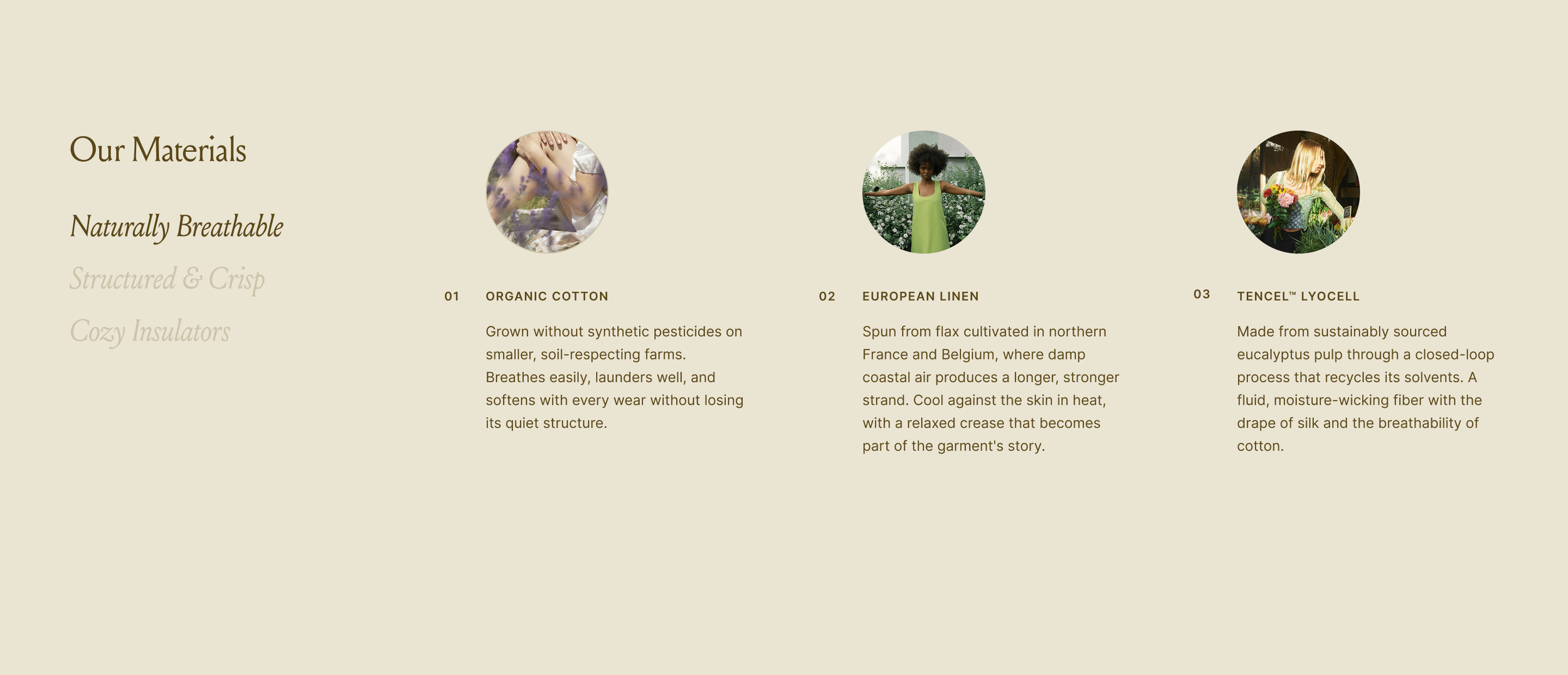
I built this custom section, which is responsive and accessible in Shopify, and it actually started out as a Figma design. I love designing first on Figma. This is how I'm able to experiment with different layouts. I'm also going to link the video where I share more about my design process.
Why I Use Claude and Its Skills Feature (00:38)
I primarily use Claude as my AI tool. I prefer Claude the most because of its skills feature, because I can assign a specific skill for a specific task.
When you click this plus icon, you'll see your database of skills, and then I do have a specific skill just for creating Shopify sections. In this skill, I included:
Best practices in writing liquid codes for Shopify
Making sure that each section that's generated is accessible and responsive
Specific instructions for themes that I typically use, which are Horizon and Dawn
But if I use a different theme, then this skill is trained to ask relevant questions such that it can create sections that are compatible with that particular theme.
Two Ways to Have Claude Reference Your Design (01:27)
There are two ways by which we can have Claude reference the design that we've created.
Option 1: Using Connectors
First is by using connectors. If you design using Figma, then you can use the Figma connector and simply share the link to your Figma file.
Option 2: Using Screenshots
But most of the time using screenshots will work. What I'll do right here is to simply take a screenshot of my design, and then upload it to our chat box, and then I can simply type "please create the section attached for Horizon theme."
We may add more information to our prompt, such as that we would like these texts in the left column to function as tabs, but most of the time I find that Claude is smart enough to identify the user's intent. So we can start just by using this simple prompt.
From Prompt to Live Section in Minutes (02:12)
It took around three minutes. It started by analyzing the layout, and then it went ahead and came up with a liquid file that we can instantly add to our Shopify.
Here's how to get it into your store:
Simply download this file generated by Claude
Open this using any text editor
Copy all the content
Paste it to your Shopify code editor
Save this file and refresh your customizer
Once you do this, you'll find that when you add a section, you'll find the new section in your sections catalog.
Easily Customizable, Not Hard Coded (02:48)
When you click it, you'll find that you can easily customize it, because this section is not hard coded, but instead it is observing best practices in building Shopify sections where users or designers can easily change the content, including text as well as images.
So I can change the label right here. Select for more existing images. You may also:
Remove tabs or add new tabs as needed
Change the colors, as with other sections within the theme
We'll also notice that it adapts to the setting of the theme. If I switch from one tab to the other, notice how it also respects the site-wide animations.
Also, the sections that are generated are responsive by design, so it looks good no matter what the browser or device size is.
Built to Be Accessible (03:42)
What I really focused on in building this skill dedicated to building Shopify sections is to advocate sections and layouts which are accessible to be compliant to accessibility regulations.
One of the requirements is for users to be able to navigate through our website just by using their screen readers or keyboard. A quick task to do on our end is to tab through the content. So, notice if I start tabbing, we'll be led to our material section.
When we have tabbed content like this:
Users must be able to navigate through the tabbed items using the arrow keys — notice I am clicking the right arrow key on my keyboard, and I'm able to easily tab through all these items
If there are links within this focused item, then our users must be able to access them too
Why Knowing How to Read Code Still Matters (04:43)
Looking back into our design, there are some more aspects that we can polish, and to polish this, having an understanding of how to code in Shopify is really useful.
You don't have to write codes from scratch or memorize the syntax; it is sufficient to just be able to read codes, especially CSS and Shopify Liquid.
You'll also make the most out of the custom, beautiful sections that you develop through this workflow by having an understanding of core Shopify features, such as meta objects and meta fields.
For example, aside from adding this section to the homepage, we can actually add this section to our product page, and then be able to pull dynamic data per product. That means even if you have tens of thousands of products, you simply need to install this section once, and it will automatically change the values of the image, as well as the text, depending on the product that is shown up.
Deepen Your Shopify Knowledge with Standout Shopify (05:38)
Hence, if you'd like to deepen your technical knowledge in terms of building Shopify websites, then I invite you to check out my program, Standout Shopify. We have resources for you, whether you are starting out as a Shopify designer or if you're already experienced.
For example, I share:
The exact workflow and skill file by which I'm able to create custom Shopify sections in minutes
The fundamentals of building Shopify sites, as well as customizing it with code
It's a monthly membership, so you can come and go as you need to. I'll walk you through the basics of building Shopify websites and running a web design business, crafting high-value Shopify websites.
By joining the membership, you'll get immediate access to the course lessons, as well as trainings like Figma Essentials and Klaviyo Essentials.