

Product Gallery Dot Navigation
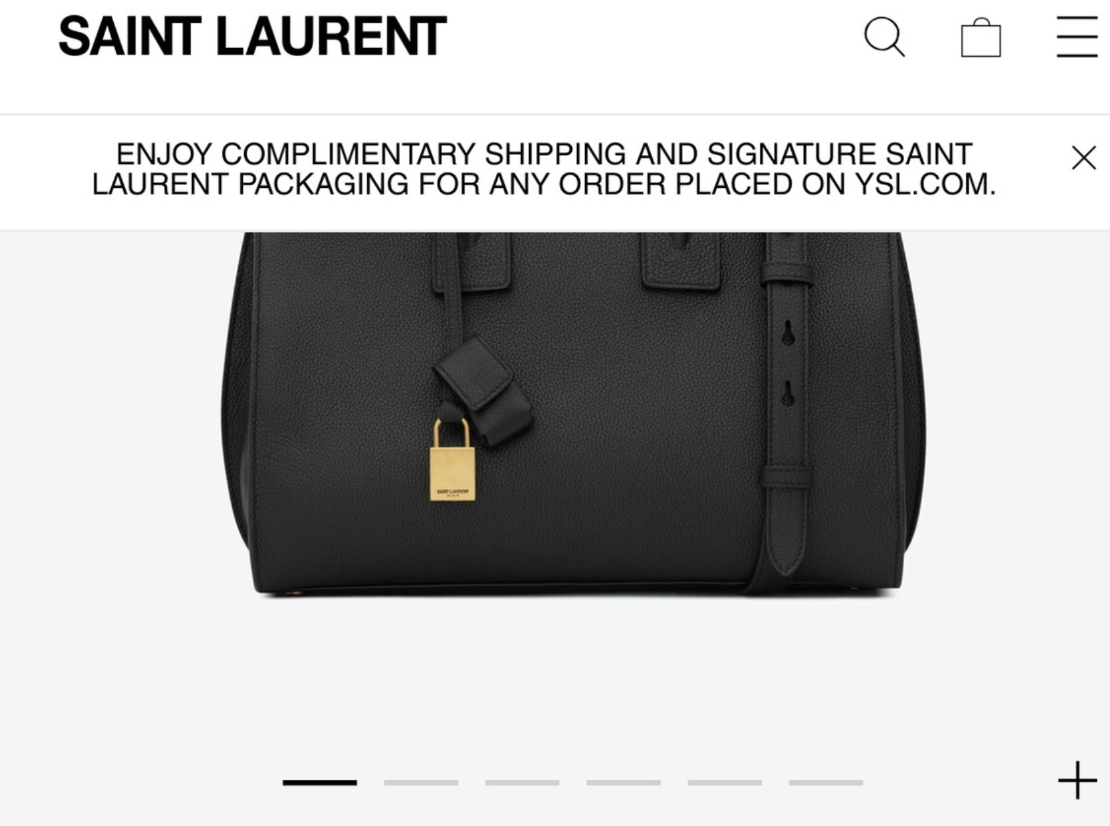
What You'll Create
Replace the default product gallery thumbnails with sleek dot navigation indicators. The gallery becomes cleaner with simple dots that highlight the current image, similar to slideshow pagination.
The Problem It Solves
Product page thumbnail navigation can look cluttered, especially with many product images. When you want a minimal indicator style instead of visible thumbnails, Squarespace doesn't offer this option. This technique transforms thumbnails into stylish dot indicators.
Perfect For
Minimalist product pages, Clean gallery layouts, Modern ecommerce, Fashion products, Lifestyle brands
What Makes This Different
This technique combines CSS to hide thumbnail images and create dot indicators with JavaScript to track the current slide. Dots change color to indicate the active image, and the gallery controls still work normally. Fully customizable dot size and colors.
Details
Section Type: Fluid & Classic
Code Type: CSS + JavaScript
Prerequisites: Product page with multiple images, Gallery thumbnails enabled
Toolkit Title: Product Page Nav Indicator
Learn This Technique
This is one of 150+ code techniques taught inside Standout Squarespace, where you get:
The complete, copy-paste code
Video walkthrough explaining how it works
The principles behind the technique so you can customize it
Access to our private community for support