

Swap Logo When Mobile Menu Opens
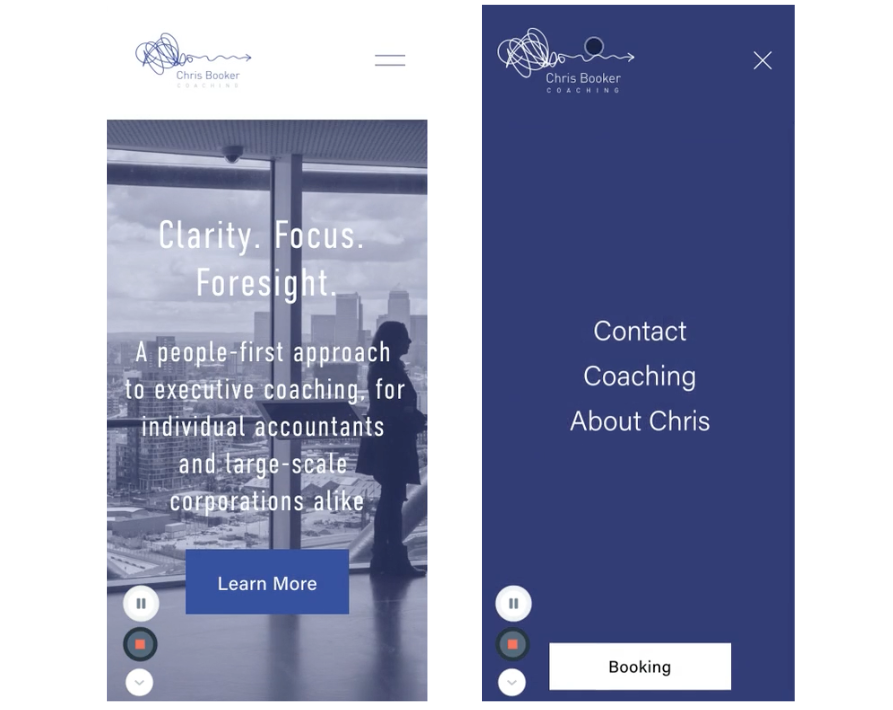
What You'll Create
Automatic logo swap when the mobile menu opens, displaying a different version of your logo against the menu background.
The Problem It Solves
When mobile menus have different background colors, the regular logo may not be visible. This technique shows an alternate logo when the menu is open.
Perfect For
Dark mode menus, Colored menu backgrounds, Light/dark logo versions, Brand consistency across states.
What Makes This Different
CSS targets the header--menu-open state to hide the original logo and display an alternate version using background-image property.
Details
Section Type: Fluid Engine
Code Type: CSS
Prerequisites: Alternate logo image URL
Toolkit Title: Change Logo when Mobile Menu is Open
Learn This Technique
This is one of 150+ code techniques taught inside Standout Squarespace, where you get:
The complete, copy-paste code
Video walkthrough explaining how it works
The principles behind the technique so you can customize it
Access to our private community for support