

Balanced Header Layout
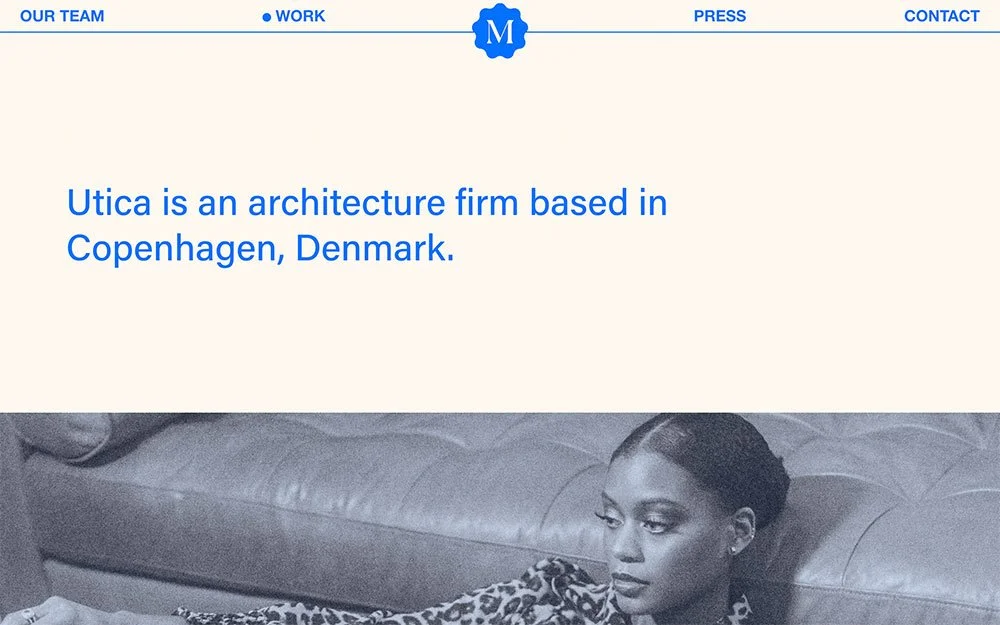
What You'll Create
A balanced header layout with the logo perfectly centered and navigation items distributed evenly on both sides. Active navigation states get a distinctive dot indicator instead of default underlines.
The Problem It Solves
Squarespace's header layouts offer centered logos or centered navigation, but achieving true balance where nav items flank a centered logo requires custom positioning. This technique creates a symmetrical header with professional active state indicators.
Perfect For
Corporate sites, Fashion brands, Editorial sites, Luxury brands, Photography portfolios
What Makes This Different
This technique uses absolute positioning to center the logo while flexbox distributes navigation items across the full width. The active state replaces default styling with a colored dot indicator. Optional border and padding controls give you complete header customization.
Details
Section Type: Fluid & Classic
Code Type: CSS
Prerequisites: Header with navigation and logo, Equal number of nav items on each side
Toolkit Title: Balanced Header Style
Learn This Technique
This is one of 150+ code techniques taught inside Standout Squarespace, where you get:
The complete, copy-paste code
Video walkthrough explaining how it works
The principles behind the technique so you can customize it
Access to our private community for support